


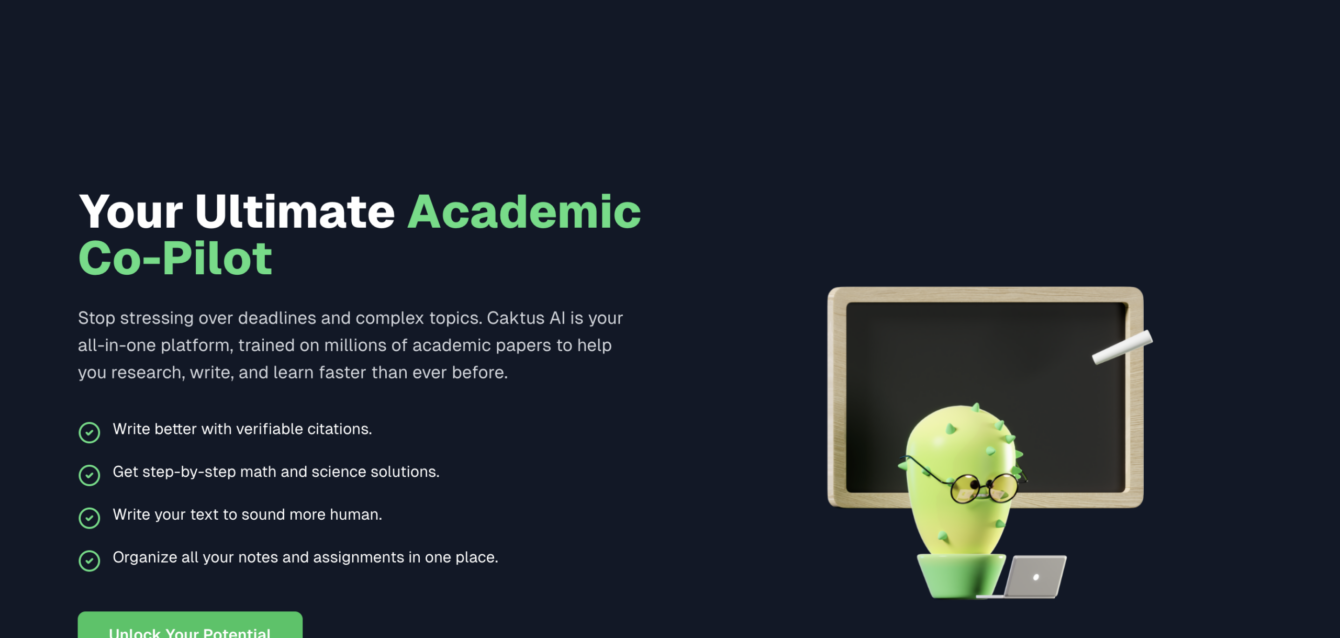
Caktus AI is known as a reliable all-in-one AI-driven tool that was specifically made for students. However, some subscribers think that this AI tool is no longer needed. Whether it is because it is underused, they are in their last semester of college, or simply they think the pricing is too high and do not want to spend more money to subscribe to Caktus AI. Regardless of the reasons to cancel your Caktus AI subscription, you are in the right place. In this article, we will give you instructions on how to cancel your Caktus AI subscription. Not only will we show you step by step how to cancel the subscription, but we will also teach you how to subscribe to Caktus AI if you are planning to rejoin.
What is Caktus AI in general?
Before helping you to unsubscribe from Caktus AI, let me explain what Caktus AI is. Caktus AI was established in 2022 by two co-founders, Tao Zhang and Harrison Leonard. Interestingly, the two founders were university students when they established this AI tool. Even though Caktus AI is still considered a small tech company based in New York City, United States, it is growing over time and gaining popularity.
Caktus AI is an all-in-one online platform for education. This app is popular for essay writing assistance and helps the student to do their homework. Interestingly, Caktus AI also has code writing and math solver features that help students, especially in STEM (Science, Technology, Engineering, and Mathematics), with their daily tasks.
Basically, Caktus AI is an AI-assisted tool to resolve students’ problems and enhance their eagerness to study more with less stress. The most notable Caktus AI features include AI-Powered Essay Writer, Homework Helper, and File Management. The three features are claimed to have a high impact on boosting the quality of essays, helping finish their homework faster, and optimising the study process to be more effective.
Why do students want to cancel a Caktus AI subscription?
As a pioneer of AI education tools, Caktus AI is obviously a game changer for students who are too stressed to do their homework. So, Caktus AI can help students a lot, but as an application, it obviously is not perfect.
- Cancellation billing problems: Billing problems are the main reason for Caktus AI users to withdraw their subscription. According to a review from Reddit, users who have cancelled their subscription on Caktus AI get charged even though they have ended it. One user claimed that Caktus AI is still charging 9.99 USD even though they cancelled subs for 2 years ago.
- No refund available: Caktus AI states that they are not providing any refund after purchase. Therefore, some users are irritated by the Caktus AI policy, and some of the users claimed the cancel button is not functioning, but the customer support instead blames the customer for not cancelling on time.
- Unresponsive customer service: Caktus AI provides customer support; however, the customer service is not smooth. Some of the reviews on Trustpilot are negative; some users state that the answers are confusing and do not help them solve the application issues.
- Credits do not value the price: Some users think that the monthly credits are not worth the price, and if the users do not use all the credit is just simply vanish. Therefore, users think that they spend more money than they get from Caktus AI.
- Not as the users expected: Some Caktus AI users might consider to not continue subscribe this tool because it is not worth the price and underdelivers. Some users claimed this tool is only better for a draft generator rather than an AI writing assistant tool. In addition, the undetectable AI feature is not working as they expected and got a higher match score for AI.
From the problem above, we can see that most of the problems with Caktus AI are related to subscription cancellation. According to Trustpilot, 80% of the written reviews give a 1-star rating for this app, and only 12% give 5-star ratings. No wonder many users need to know how to cancel their Caktus AI subscription without a complicated process. Before diving deeper into the cancellation process, you might need to know the pricing and plans of Caktus AI below.
Is Cactus AI Free? Here is the Cactus AI pricing lists
When we are asked about “is Caktus AI free?”, unfortunately, Caktus AI is not free. This app only provides a free tier for limited functions and does not offer a full free plan for its users. However, the free plan can be used to check if the app is worth it or suitable for potential customers before deciding to pay for a plan.
Caktus AI basically only offers two paid plans comprising monthly and annual payments. Unlike other premium and multimodal AI tools, Caktus is considered cheaper than other AI-powered tools in the market. For those of you who are considering paying for this app, we have depicted the pricing plans in the table below.
| Tier | Prices | Best for |
| Free (Limited Trial) | $0/month | Trying out Caktus AI before considering a paid plan |
| Monthly Paid Plan | $30/month | Short-term commitment and get full access to all features. |
| Annual Paid Plan | $15/month or $180/year | Long-term commitment for assisting with study and doing tasks or homework. |
How to cancel Cactus AI Subscription (Desktop)
Although Caktus AI is considered an affordable AI application, some people might think of unsubscribing to this app. We never know the exact reason users need to cancel their subscription on Caktus AI, but some people may not really use it. Some also do not need Caktus AI because they have graduated from college or school. So, the explanation below will teach you how to cancel your Caktus AI subscription.
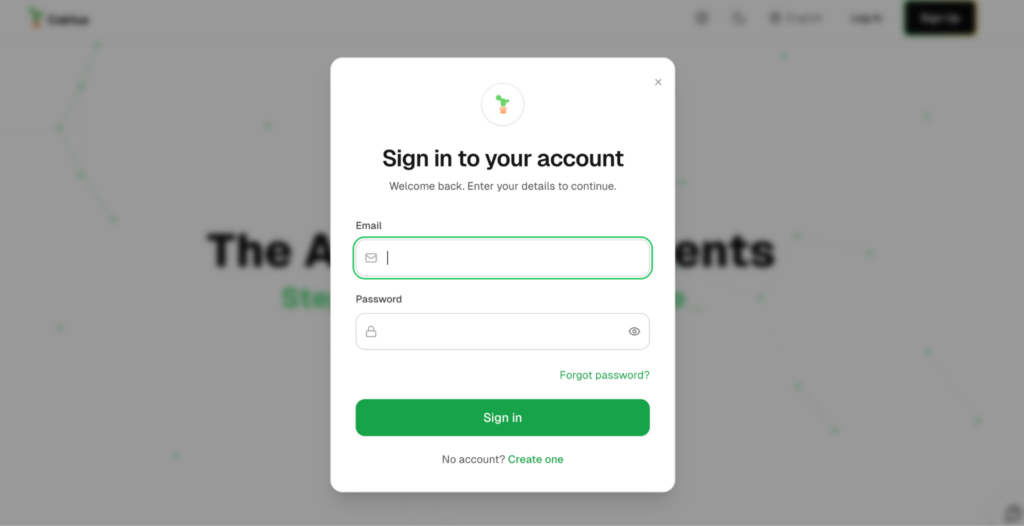
Step 1: Sign in to your Caktus AI account
Log in to your Caktus AI account and enter the registered email and type your password accordingly.
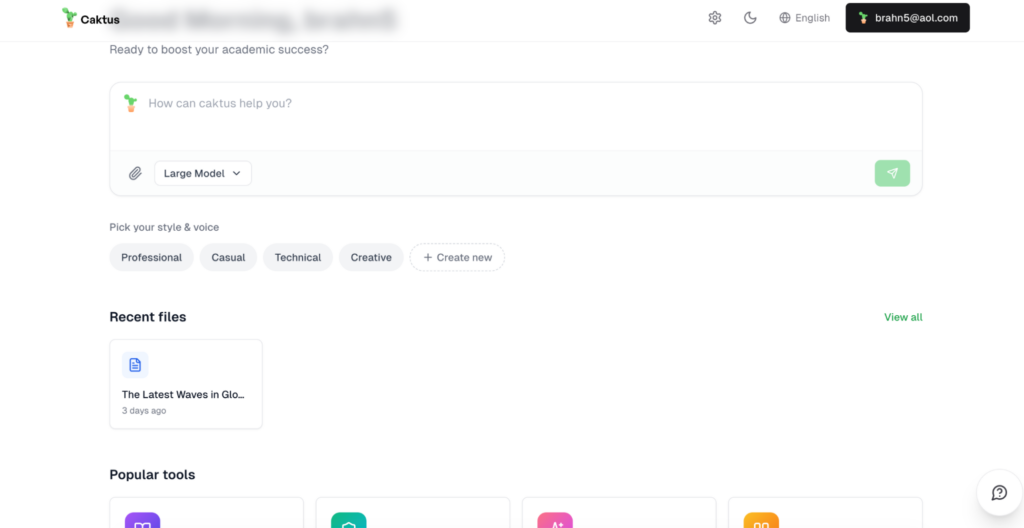
Step 2: Choose Settings and find the Billing section
Once you are at the Caktus AI Dashboard, you can tap the Settings button on the right-hand side of the page. Just click the Billing section to start the cancellation.
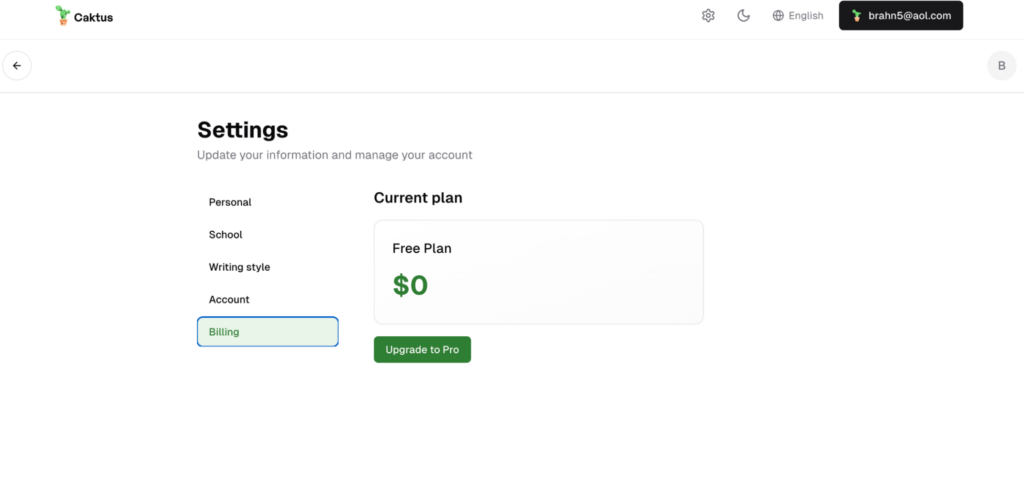
Step 3: Navigate to Subscription Cancellation
Once you are in the Billing section, scroll down to find the Manage Subscription and tap Cancel Subscription.
Step 4: Fill out the optional survey from Caktus AI
There is an optional survey from Caktus AI before finalizing your cancellation. However, it is optional, and you are allowed to skip this survey.
Step 5: Verify Subscription Cancellation
After finishing the survey, review the date you want to cancel the subscription and click Confirm Cancellation. Then, please wait until they send the cancellation confirmation email.
How to cancel Cactus AI Subscription (Mobile)
After understanding how to cancel a Cactus AI subscription on desktop, we might need to know how to cancel a Cactus AI subscription on mobile. Whether you are using iOS or Android, the steps to unsubscribe from Cactus AI are the same. So, let’s take a look at the step-by-step guide to cancel your Caktus AI subscription on the mobile app below.
Step 1: Open the Caktus AI app on mobile
Open Caktus AI on your mobile phone, whether on iOS or Android, and log in to your registered account.
Step 2: Click Settings on the Caktus AI dashboard
Similar to the website version, you need to visit Settings to find the Subscription option on Caktus AI.
Step 3: Tap the Subscription button
If you are an iPhone user, the cancellation is easier than the Android counterpart: select cancel on Subscription and click Confirm.
Step 4: Click “Shut it down right there” to cancel the subscription
For Android users, you need to click “Shut it down right there” to cancel the Caktus AI subscription.
How to cancel Cactus AI subscription using Contact Support
If you have failed to cancel the subscription using the common method on the website or app, then you need to use Contact Support. As we mentioned, billing errors are quite common in Caktus AI; therefore, we recommend using customer support to solve your issue. Here are the instructions to cancel your Caktus AI subscription using Contact Support.
Step 1: Open your email and send the cancellation request
This is similar to an email inquiry on other applications, by stating clearly all of your issue of cancellation on regular method on Caktus AI. Then, send the email to support@caktus.ai.
Step 2: Wait until Caktus AI replies to your email
Once you have submitted the inquiries to Caktus AI contact support, you just need to wait until they respond. The response will usually be within 24 hours.
Step 3: Contact support to cancel the subscription
Once they answer your problem, Caktus AI support will explain how to cancel your subscription. This method not only works for canceling a Caktus AI subscription, but also works for any problems related to the Caktus AI services.
How to rejoin a Caktus AI subscription
After understanding how to cancel a Caktus AI subscription, you may in the future need to resubscribe to this app. Please note that if you are not deleting your account, then your account is still active for the free version. If so, we will give instructions to rejoin the Caktus AI subscription easily through these steps.
Step 1: Log in to your Caktus AI account
Step 2: There is a pop-up appears on the Caktus AI dashboard
Step 3: Choose Start now to reactivate your account
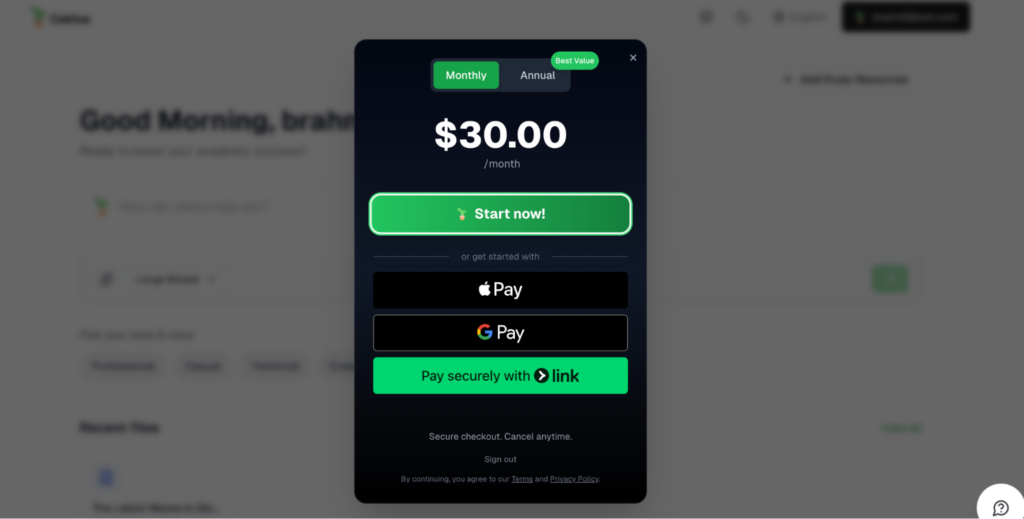
Step 4: Fill in the billing option
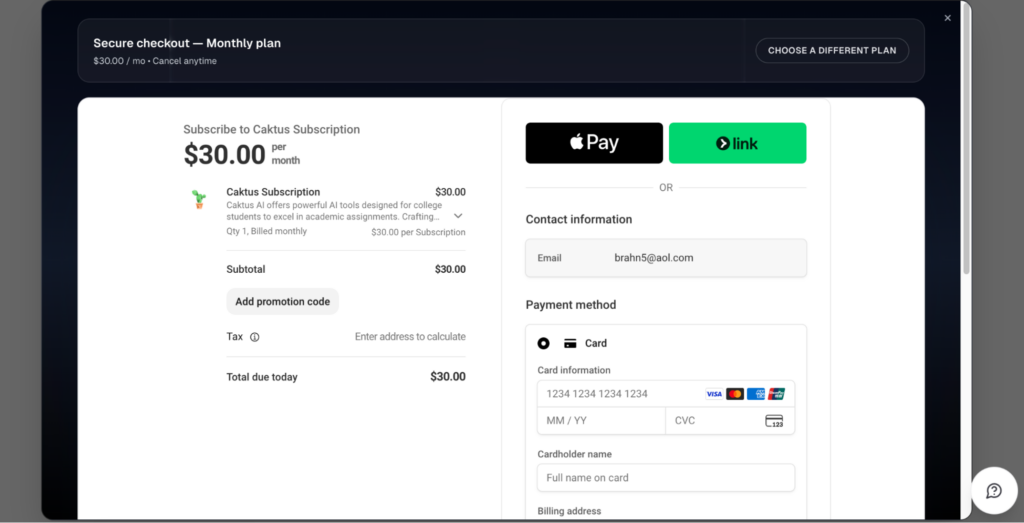
As you can see, rejoining Caktus AI is very easy, and you can just fill in the payment on the pop-up dashboard. However, the main problem with this app is subscription cancellation, which requires extra effort, and some of the users claimed failure.
Other options before cancelling the Cactus AI subscription?
If you are confused about whether to end the Cactus AI subscription or not, we will give you other options before canceling the subscription. Here are the options as alternatives before cancelling the Cactus AI subscription.
1. Downgrade your Caktus AI subscription plan
Downgrading your Caktus AI subscription may be a better option for you if you only need to use this app service for a limited time. So, instead of subscribing for a year, you can choose the monthly subscription even though the price is higher than a year subscription.
2. Pause your Caktus AI subscription
Before cancelling your Caktus AI subscription, users are allowed to pause their subscription. This feature is useful for someone who still needs the Caktus AI service in the near future, but does not use it for some time.
3. Claim a Caktus AI discount for students
Not many people know that Caktus AI actually provides a generous option for students with a 20% discount. So, if you have an email account with the university domain or .edu, then you will receive the discount. Also, you can check the content creator or partnership creator who mentioned the promo code to get a discount from Caktus AI.
What are Cactus AI alternatives?
If you think that Caktus AI is no longer reliable, then you can choose to use other similar AI tools. As we know, Caktus AI is not the only app that is uniquely designed for students, and there are many other useful tools for study. We have collected five Caktus AI alternative tools as follows:
1. Jenni AI
Jenni AI is known as an AI writing application that is very useful and reliable for students. This AI tool is designed to solve students’ problems while writing essays or other academic writing papers or research. In comparison with Caktus AI, Jenni AI is solely functional for students to resolve their writing tasks and does not offer coding or math solvers.
2. Textero
Textero is widely known as a tool focused on academic writing and research. Textero is a competitor of Jenni AI rather than Caktus AI, in general, and it is useful for students who need to write essays, along with a built-in grammar error checker, AI detection, and plagiarism checker to ensure their writing paper is perfect.
3. Notion AI
Notion AI is different than Textero and Jenni AI; it is focused on helping students organize their study and tasks. By using this AI tool, students or educators can set up their class schedules and task deadlines to ensure all their activities are recorded appropriately in Notion.
4. Symbolab
Different from all the apps above, Symbolab is known as an app that has a specialty in math. Symbolab provides tons of features for math, including a calculator, graphics, geometry, and others. In comparison with Caktus AI, it also provides a calculator, but Symbolab is more accurate for students who need to solve math problems.
5. Bartleby
Bartleby is one of the applications made to support students, and it is considered one of the main competitors of Caktus AI. This tool provides numerous features that are made for STEM or SHARE students, including an essay checker, citation generator, tutor, as well as answers aligned with the textbook for explanations.
The apps above are made specifically to help students solve their problems while studying. But other apps can help students or researchers based on their difficulties. If you are a student who is focusing on grammar or citation builders, you may consider choosing Quillbot and Grammarly. In addition, if you are a university law or public policy student, researcher, or legal practitioner who is dealing with regulations, you can use ChatScopeAI.
Conclusion
Caktus AI is no doubt one of the choices for students to solve their issues while pursuing an educational degree with all its features. However, we cannot avoid the recent issues with Caktus AI, particularly with cancelling subscriptions. Some users claimed they failed to cancel their subscription plan even though they have followed the correct steps. Despite this problem, you can cancel your Caktus AI subscription accordingly. We recommend you to use website to cancel your subscription on Caktus AI rather than use the mobile app. Even if you fail to cancel, just contact Caktus AI support to help you with the cancellation process.
Frequently Asked Questions (FAQs) about How to Cancel Caktus AI Subscription
1. What makes students choose Caktus AI instead of other tools for assisting their tasks or homework?
Caktus AI is quite different from other academic AI tools that are specifically made for students. It is mostly established as a comprehensive assistant for students to do tasks or homework rather than only an AI writing assistant; therefore, many students choose this app to get an all-in-one service.
2. Is Caktus AI an app that is only developed for writing essays?
No, Caktus AI is an all-in-one app for education, and it has tons of features that can help students learn and do their homework. No wonder Caktus AI is sought after by students who need an assistant for their studies.
3. Is cancelling a Caktus AI subscription complicated?
Yes, cancelling Caktus AI is basically similar to other AI tools or other applications in general. It can be done easily without any restrictions, and you can do that by yourself and just follow our instructions above to ensure that you do not need to subscribe to this app.
4. Why do users need to cancel a Caktus AI subscription?
We cannot give the detailed reason, actually, because there are many reasons for users to not continue with Caktus AI. However, some users, who are mostly students, think that they do not need it anymore, underuse it, and would be better off not continuing to subscribe to Caktus AI.
5. What is the problem users found when using Caktus AI?
Based on the reviews from Reddit and Trustpilot, most of the users find a problem when they need to cancel their subscription on Caktus AI. Even one user found they still got charged even if 2 years since they ended their subscription on Caktus AI. These issues have affected Caktus AI’s ratings, which makes the majority of reviews negative and obviously has a severe impact on Caktus AI’s image.
6. Is customer support on Caktus AI helpful?
Yes, but some reviews state that Caktus AI customer support is not really helpful in terms of cancelling the subscription. They claimed that Caktus AI support gives a confusing explanation to their users.
7. Is Caktus AI good or bad for students?
Caktus AI is actually a great app for students who are stressful to finish their tasks. However, some users claimed that this app is not worth the price and has no refund option, which makes them frustrated and choose to cancel their Caktus AI subscription.
8. Is Caktus AI useful for STEM students?
Yes, Caktus AI is an all-in-one study platform that covers many features, including Math Solver, Chemistry Tutor, and Coding Support. These features are very useful for students who are pursuing a STEM degree.