


When legal teams, compliance officers, corporate investigators, and those involved in litigation have to go through thousands or even millions of files in order to find the information that is actually relevant, the process becomes slow, costly, and hard to manage because emails, contracts, spreadsheets, PDFs, presentations, chat messages, scanned documents, images, and other types of electronically stored information can be. It is in such cases that document review tools can make a real difference.
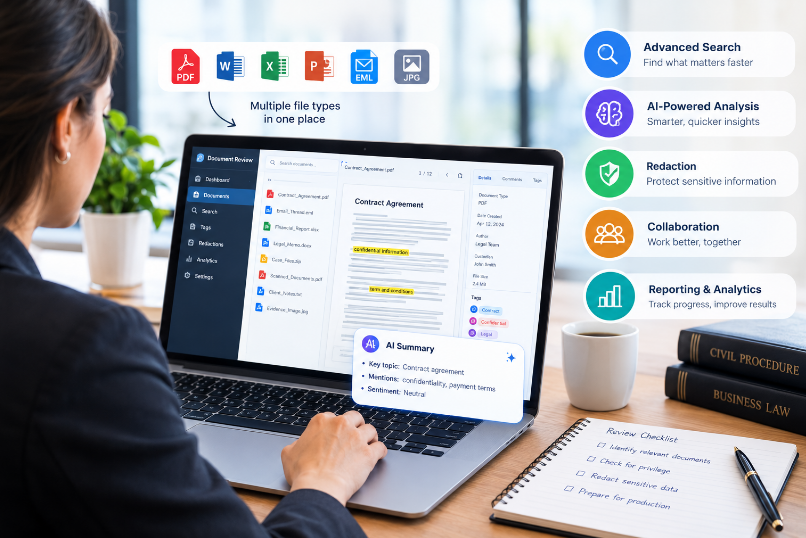
Document review tools nowadays are created to enable teams to collect, organise, search, classify, tag, analyse, redact and produce documents all within a single, central environment. A number of the platforms currently combine conventional review procedures with artificial intelligence, machine learning, natural-language search, optical character recognition, predictive analytics, and technology-assisted review.
A suitable platform can cut down on repetitive tasks and at the same time provide reviewers with better visibility of large amounts of information; yet it is not always easy to decide among the various document review tools available nowadays, since some of the platforms are designed for large-scale litigation and enterprise eDiscovery, whereas others are more appropriate for contract analysis, investigations, compliance projects, or for smaller legal teams.
The article looks at the 12 best document review tools which legal and professional teams might consider in 2026, with the comparison concentrating on the main capabilities, suitable applications, strengths, limitations, and the type of organisation that each platform is best for.
What are document review tools?
Document review tools are software programs which aid experts in examining large amounts of digital information more efficiently. Rather than opening the files individually in separate applications, reviewers are usually able to work through a central interface on which it is possible to search for documents, filter them, tag them, classify them, make annotations, remove sensitive information, and carry out an analysis.
In legal situations, such platforms are often linked with electronic discovery, investigations, litigation support, regulatory responses, and due diligence. A typical workflow will include the collection of electronically stored information, the processing and indexing of the data, the removal of duplicates, searching for relevant information, reviewing the documents, identifying any privileged material, carrying out quality control, and getting the documents ready for production.
There are considerable differences in what document review tools can do. Enterprise systems can provide sophisticated analytics, artificial intelligence, workflow management, audit trails, the ability to batch reviews, advanced reporting, and integrations with a wide range of data sources.
For example, the platform offered by RelativityOne includes workflows relating to preservation, collection, processing, review, redaction, and production, and currently features AI features for carrying out analyses on relevance, issue, privilege, and other aspects.
The aim goes beyond just making documents easier to read; a good review platform should help a team to answer important questions such as:
Which documents are relevant?
Which documents are duplicates?
What files contain confidential or personally identifiable information?
What kinds of communications may be privileged?
What documents need further investigation?
To what extent has the review been completed?
Is it possible to document and defend the review process?
What is the importance of document review tools?
The more data there is, the harder manual review becomes. A legal team working with a few dozen documents might not need sophisticated software 7 Multiple Ways to Save a Google Doc as a PDF but when dealing with tens of thousands or millions of records it does require a more systematic method.
The most effective document review tools are able to assist organizations in improving various aspects of the review process.
Faster Document Processing
Before the reviewers start their detailed analysis, the large datasets can be processed, indexed, and organised. This in turn cuts down the time needed for carrying out repetitive administrative tasks.
Better Search and Filtering
Using advanced search, reviewers are able to reduce large datasets by means of keywords, metadata, concepts, filters, communication patterns, dates, the names of the custodians, and other criteria.
Improved Collaboration
Several reviewers can carry out their work on the same matter as long as they adhere to the predefined review protocols. Managers are able to keep an eye on the progress and detect any possible inconsistencies.
AI-Assisted Analysis
Most modern platforms make use of machine learning or generative AI in order to identify documents that may be relevant, to summarize information, to detect patterns, to classify the content, or to decide which documents should be sent for human review.
Security and Auditability
The information contained in legal documents can be of a highly confidential nature. Enterprise document review tools usually include permission controls, encryption, audit trails, and other security features.
The American Bar Association states that attorneys have a professional obligation to understand the relevant technology together with its benefits and risks, and it also names linear review, non-linear review, and technology-assisted review as significant methods of carrying out document review.
12 Best Document Review Tools for Legal and Professional Teams
RelativityOne is one of the most well-established enterprise platforms in the eDiscovery and legal technology sector and it is intended for companies that are dealing with complex litigation, investigations, regulatory issues, and the review of large amounts of data.
1. RelativityOne
The platform includes workflows that span the entire discovery lifecycle, covering data preservation, collection, processing, review, analysis, redaction, and production.
A major advantage is scalability, since teams can work with large datasets by making use of centralised review workflows, reporting, analytics, and permissions.
Relativity has also extended its generative AI capabilities since it now offers Relativity aiR for Review which can assist with identifying relevant content, analysing issues, spotting the key documents, and supporting review workflows when dealing with large collections.
Key Features
Enterprise eDiscovery
AI-assisted review
Predictive and technology-assisted review workflows
Document batching
Advanced searching
Redaction
Privilege review
Production management
Reporting and analytics
Large-scale data processing
Best For
RelativityOne is especially well suited to large law firms, corporations, government organizations, and litigation teams which are dealing with complex or high-volume cases.
Potential Limitation
Because of its wide range of features the learning curve can be steeper than that of simpler platforms, and smaller organizations might discover that the amount of functionality offered by an enterprise-oriented platform is more than they really need.
2. Everlaw
Everlaw is a cloud-based eDiscovery platform designed with the aim of making it easier for legal teams to carry out complex review processes. The platform offers facilities for document discovery, analysis, collaboration, review, and production.
A major benefit of Everlaw is that it places a strong focus on collaborative review; teams are able to organize documents, set up review workflows, search the information, and keep an eye on project progress all within a single environment.
Everlaw also includes automated review and analytics; third-party platform evaluations usually point out features such as document filtering, tagging, project analytics, automated review, reporting, and permissioned access.
Key Features
Cloud-based document review
Advanced search
Document tagging
Analytics
Automated review
Collaboration
Production workflows
Review reporting
Permission management
Best For
Everlaw is a good choice for law firms and corporate legal departments that require a collaborative cloud-based review environment.
Potential Limitation
Teams that have very simple document-review requirements might find that they need a complete eDiscovery platform.
3. DISCO
DISCO is also a well-known name within the field of modern document review tools, especially among those teams involved in litigation and eDiscovery. The platform is designed with the aim of making it easier to collect, process, review, analyse, and produce electronic information.
When assessing DISCO, one important point is its focus on automation, since automated processes can assist teams in getting rid of repetitive manual work and allow reviewers to concentrate on the information that calls for human judgment.
Key Features
eDiscovery
Document processing
AI-assisted analysis
Search and filtering
Review workflows
Analytics
Production
Collaboration
Case management capabilities
Best For
DISCO is worth looking at for law firms, corporate legal departments, and litigation teams which require an integrated review and eDiscovery environment.
Potential Limitation
Just as with other platforms aimed at businesses, the pricing and the considerations regarding implementation mean that it is more suitable for organizations that have regular or substantial review needs.
4. Logikcull
Logikcull is built with the aim of simplifying eDiscovery and of making the process of reviewing documents accessible even without requiring highly specialised technical knowledge.
The system allows for data collection, processing, searching, reviewing and production. The platform claims that it is capable of automatically handling the information that has been uploaded, including the extraction of metadata, the use of OCR, deduplication and other processing activities.
Logikcull also provides automated tagging and allows for searches using natural language. The platform has features which enable the identification of personally identifiable information, content related to privilege, near duplicates, and other types of information.
Key Features
Drag-and-drop data collection
Automated processing
OCR
Deduplication
Email threading
PII detection
Privilege-related tagging
Natural-language search
Review workflows
Production
Best For
Logikcull is very appealing to teams who are looking for a fairly simple eDiscovery and review process.
Potential Limitation
When organisations are dealing with highly complex enterprise issues, they might have to compare the depth of their existing workflow with that of larger platforms before reaching a decision.
5. Reveal
Reveal is a platform which focuses on AI and that integrates conventional review processes with artificial intelligence and analytics.
The platform is intended to assist teams in identifying relationships, patterns, and information which may be important when looking at large datasets; it is useful in cases where simple keyword searches on their own are not sufficient for uncovering relevant information.
Key Features
AI-assisted document review
Predictive analytics
Concept searching
Data visualization
Communication analysis
Review management
eDiscovery
Investigative workflows
Best For
Reveal is useful to litigation teams and investigators who are working with large or complex datasets since relationship analysis and AI-assisted discovery can provide extra context.
Potential Limitation
An analysis based on AI still needs proper validation and human supervision, especially where decisions have legal or regulatory implications.
6. Luminance
Luminance differs in some ways from conventional eDiscovery platforms that focus on litigation; it is closely linked with the use of AI in legal document analysis, contract review, and in legal workflows.
Instead of just helping reviewers find the documents that are responsive in a litigation situation, Luminance can help legal professionals to understand the contracts and to spot potentially important clauses, obligations, risks, and inconsistencies.
Key Features
AI-powered contract analysis
Legal document analysis
Clause identification
Risk identification
Contract comparison
Due diligence support
Document organization
AI-assisted workflows
Best For
Luminance would be suitable for corporate legal teams, contract management departments, and companies that carry out extensive due diligence or agreement analysis.
Potential Limitation
Those teams which are mainly concerned with large-scale litigation eDiscovery should compare Luminance to platforms that are specifically designed for discovery processing and production.
7. Nuix Neo
Nuix is recognised for its ability to process, analyse and investigate large amounts of unstructured data, and its technology is applied in fields including eDiscovery, investigations, risk management and compliance.
Nuix can be beneficial for organisations working with complex data environments since contemporary investigations generally go beyond traditional office documents and may involve emails, archives, databases, communications and other digital sources.
Key Features
Large-scale data processing
eDiscovery
Investigation workflows
Data analytics
Information governance
Digital investigation support
Search and classification
Compliance-related analysis
Best For
Nuix is suitable for use by large enterprises, government organizations, forensic teams, and Legal Search Automation service providers who have to deal with complex datasets.
Potential Limitation
Because of its wide range of functionality it will be necessary to have skilled professionals and to carry out proper implementation planning.
8. Exterro
Exterro offers technology that is used for legal, privacy, compliance, and digital investigations; its platform method is especially useful for companies which want document review capabilities to be linked with wider information governance and risk-management workflows.
Rather than viewing document review as a separate task, organizations can make use of a more comprehensive platform to handle information at various stages of a legal or compliance process.
Key Features
eDiscovery
Legal hold
Data collection
Document review
Privacy management
Investigations
Information governance
Compliance workflows
Best For
Exterro is a viable option for large organisations in which legal discovery comes into line with privacy, compliance, and information-governance requirements.
Potential Limitation
Anyone who is only interested in a simple document review application need not have its more extensive platform features.
9. CloudNine LAW
CloudNine LAW is a platform which provides legal review and assistance in litigation aimed at helping professionals handle electronic discovery and cases that involve a large number of documents.
It includes the means to process and review documents, search through datasets, manage case information, and assist with litigation workflows.
Key Features
eDiscovery
Document processing
Review
Search
Filtering
Case management
Production
Litigation support
Best For
Law firms and litigation-support professionals who want reliable review features without having to adopt the biggest enterprise platforms may consider CloudNine LAW.
Potential Limitation
When deciding on it, teams should compare its present integrations, AI features, scalability, and workflow requirements with those of more recent cloud-first competitors.
10. Casepoint
Casepoint is a platform based in the cloud which is designed to be used in the context of litigation, investigations and regulatory matters; it offers the ability to collect, process, review, analyse and produce electronically stored information.
When it comes to Casepoint, a key factor is the system’s capability to support complex workflows within a central environment.
Key Features
Cloud eDiscovery
Data collection
Processing
Document review
Analytics
AI-assisted workflows
Legal hold
Production
Reporting
Best For
Casepoint is suitable for use by law firms, government agencies, corporations, and other organizations that are dealing with complex litigation or investigations.
Potential Limitation
Instead, organizations should use a real representative dataset when assessing the platform rather than depending solely on the list of features.
11. Venio
Venio is a platform which has been developed for the purpose of assisting organisations in processing and analysing large amounts of electronic information.
The capabilities are designed to assist legal professionals in going through the discovery lifecycle and in reducing the amount of manual work that is unnecessary.
Key Features
Data processing
eDiscovery
Document review
Search
Analytics
Legal hold
Production
Review management
Best For
Venio is worth considering for law firms, corporations, and service providers which need an integrated discovery environment.
Potential Limitation
Just as is the case with any purchase of legal technology, organizations should check the platform’s support model, its implementation requirements, the integrations it offers, its security controls, and its pricing structure before making a decision.
12. GoldFynch
GoldFynch is a cloud-based eDiscovery platform which has been developed in order to make electronic discovery more accessible, especially to smaller organisations and legal teams.
The way it approaches the problem stresses simple document processing, searching, reviewing, and producing.
Key Features
Cloud-based eDiscovery
Document processing
Search
Review
Organization
Production
Collaboration
Case management
Best For
GoldFynch is appealing to smaller companies, independent practitioners, and teams which need eDiscovery capabilities without having to adopt a highly complex enterprise platform.
Potential Limitation
Large organizations dealing with highly complex and high-volume matters might need more advanced enterprise-level analytics and workflow customization.
Comparison of the 12 Best Document Review Tools
| Tool | Best For | AI/Automation | eDiscovery | Contract Review | Enterprise Focus |
| RelativityOne | Large litigation and enterprise matters | High | Excellent | Good | Excellent |
| Everlaw | Collaborative legal review | High | Excellent | Moderate | High |
| DISCO | Modern litigation workflows | High | Excellent | Moderate | High |
| Logikcull | Simpler eDiscovery | High | Excellent | Limited | Medium |
| Reveal | AI-assisted investigations | High | Excellent | Moderate | High |
| Luminance | Contracts and legal analysis | High | Moderate | Excellent | High |
| Nuix Neo | Complex investigations | High | Excellent | Moderate | Excellent |
| Exterro | Legal, privacy, and compliance | High | Excellent | Moderate | Excellent |
| CloudNine LAW | Litigation support | Moderate | High | Limited | Medium |
| Casepoint | Enterprise eDiscovery | High | Excellent | Moderate | Excellent |
| Venio | Discovery and review | Moderate/High | High | Limited | Medium/High |
| GoldFynch | Smaller legal teams | Moderate | High | Limited | Small/Medium |
The table should be treated as a high-level comparison rather than a substitute for product demonstrations. Capabilities, integrations, pricing, and availability can change as vendors release new versions and AI features.
What features should you consider when choosing document review tools?
When deciding between different document review tools it is necessary to go beyond simply comparing the number of features offered on a vendor’s website, since the key question to ask is whether or not the platform suits the real workflow of your organization.
1. Advanced Search
One of the most important features is search, which includes methods such as Boolean search, metadata filters, concept search, natural-language queries, proximity searching, and other ways of narrowing down large datasets.
With a powerful search engine it is possible for reviewers to go from millions of records to a small and manageable number of reviews.
2. AI-Assisted Review
AI can help find useful information. It can sum up documents, sort records, spot patterns, and set review priorities.
AI should instead support professional judgment rather than replace it, and the American Bar Association stresses the importance of understanding the benefits and risks connected with technology-assisted review.
3. OCR
It is necessary to use optical character recognition when the collection of reviews includes scanned documents or PDF files based on images.
If there is no optical character recognition, then information contained in images will not be searchable.
4. Deduplication
Copying documents can unreasonably lead to a greater volume of reviews. The ability to deduplicate helps teams to spot records that are identical or almost identical and lessens repetitive work.
5. Email Threading
Email exchanges frequently include several copies of the same discussion and email threading can help reviewers to understand the conversations at the same time as reducing the number of unnecessary duplicate reviews.
6. Privilege Review
Legal teams need workflows that are reliable in order to identify communications that may be privileged. Review platforms should offer suitable tagging, search, quality-control, and audit features.
7. Redaction
A good platform ought to allow sensitive information—such as personally identifiable information, financial information, protected health information, or other confidential material—to be identified and removed.
8. Collaboration
It is essential to have collaboration facilities when multiple lawyers, paralegals, investigators, or contract reviewers are working on the same case.
Check the role-based permissions, look at the review assignments, comments, tagging, reviewer questions, dashboards, and the progress reporting.
9. Audit Trails
It is necessary for legal teams to know who carried out the actions and at what time; audit trails can be used to ensure quality control, accountability, and defensibility.
10. Data Security
Security must be one of the key factors when making a choice. You should assess the encryption, the access controls, the authentication methods, the data residency, the certifications, the incident response procedures, and the vendor’s security practices.
How AI Is Changing Document Review
The way in which professionals carry out large-scale reviews is being altered by artificial intelligence, since conventional workflows usually involved reviewers having to go through the documents manually and make use of predefined searches in order to find possibly relevant information.
Modern document review tools can incorporate machine learning, natural-language processing, predictive analytics, and generative AI into that process.
AI can assist with:
Document classification
Relevance identification
Summarization
Entity extraction
Issue identification
Privilege analysis
Similar-document detection
Natural-language search
Data clustering
Communication analysis
PII detection
The American Bar Association regards the use of AI for reviewing legal documents as a means of automating activities such as eDiscovery and summarization, stressing the importance of human supervision, security, clear guidelines, and ethical considerations.
The key point is that having an AI assist with the review is quite different from handing over the whole legal matter to an automated system; humans are still responsible for verifying the significant findings, understanding the context, checking the AI’s outputs, and making the necessary professional judgments.
How to Choose the Right Document Review Tool
No single document review tool can be considered the best choice since the right option will vary according to your organization, the amount of data, the type of case, your budget, the technical requirements, and the review method you adopt.
For Large Law Firms
Large law firms might place a priority on scalability, advanced analytics, a wide range of integrations, review management, production capabilities, security, and sophisticated AI workflows.
RelativityOne, Everlaw, DISCO, Reveal, Casepoint, Nuix, and Exterro should therefore be subject to a more detailed evaluation.
For Smaller Firms
Small companies might choose a platform which is simpler to set up and one that doesn’t need a large technical team.
Logikcull and GoldFynch should be taken into consideration if simplicity and accessibility are of major importance.
For Contract Teams
Should the main thing you need be the analysis of agreements rather than litigation discovery, then a contract-specific platform such as Luminance might be more suitable than a conventional eDiscovery platform.
For Investigations
Any organisation carrying out internal inquiries, fraud investigations, compliance reviews or extensive data analysis might wish to have more powerful analytics and abilities in the area of relationship analysis.
The use cases could be met by choosing Reveal, Nuix, RelativityOne, or Exterro.
What is the difference between document review software and eDiscovery software?
The two terms are closely related but are not always interchangeable.
Most document review software is concerned with examining, organizing, searching, analyzing, tagging, and categorizing documents.
Typical eDiscovery software involves a wider range of processes which can encompass legal holds, data collection, processing, review, analytics, production, and other discovery activities.
Most modern document review tools are in fact part of bigger eDiscovery platforms. For instance, an enterprise system could enable a legal team to collect the data, process it, review the documents, carry out quality control, redact any sensitive information, and produce the final set all within a single environment. RelativityOne refers to this kind of end-to-end eDiscovery workflow.
For any organization that has to deal with ongoing litigation or regulatory issues, use of an integrated platform can lessen the requirement to pass on information between various systems.
What is the cost of document review tools?
Pricing varies substantially.
Certain platforms charge according to the amount of data, whereas others offer user-based subscriptions, charge on a per-matter basis, require minimum commitments, or provide customized enterprise agreements.
The total cost can also include:
Data processing
Hosting
Storage
User licenses
Professional services
Implementation
Training
Support
AI usage
Production
Data exports
It therefore follows that relying solely on the advertised subscription price might be misleading.
A more effective method is to work out the expected total cost of ownership for an average case. You should request from the vendors a realistic estimate taking into account the data volume you expect, the number of reviewers, the average length of the matter, and the production requirements.
Best Practices for Using Document Review Tools
Choosing the correct software is only one element of a successful review project.
Create a Clear Review Protocol
Before the reviewers begin their work, clear instructions should be put in place regarding responsiveness, the handling of issues, confidentiality, privilege, personal information, and the escalation procedures.
Relativity also stresses the need for a substantial review protocol and for the coding instructions to be clearly defined.
Train Reviewers
No matter how good the platform is, it can’t make up for reviewers who have not received proper training. It is important for teams to understand both the legal requirements and the software workflow.
Test AI Before Large-Scale Use
AI must be assessed using a typical sample before it is relied upon for major decisions.
Perform Quality Control
It is important to carry out random sampling, have a second-level review, perform consistency checks, and carry out validation if review quality is to be maintained.
Monitor Progress
Identify slow reviewers, coding inconsistencies, unexpected document populations, and other problems early by using dashboards and reporting.
Protect Sensitive Information
It is important to use the correct access controls and security settings, in particular when the dataset includes confidential client information, personal information, trade secrets, or privileged communications.
Common Mistakes When Selecting Document Review Tools
Teams with a great deal of experience are capable of making errors when assessing legal technology.
Choosing Based Only on AI
Although AI capabilities are valuable they shouldn’t be the only consideration because search, processing, security, reporting, integrations, review management, and production are just as important.
Ignoring Usability
A platform that is technically powerful can cause difficulties if the reviewers find it hard to navigate.
Failing to Test Real Data
Even a vendor’s demonstration might appear impressive, but the real performance could be different when applied to your organization’s own datasets.
Overlooking Security
Legal information is very sensitive, so security must be checked before a platform is chosen rather than after it has been implemented.
Focusing Only on Price
A lower-priced platform could end up being more expensive if it necessitates extra services, manual effort, or a number of external systems.
Not Planning for Growth
A proper solution should be one that accommodates future data volumes and evolving workflows rather than merely addressing the problem of today.
Are document review tools taking the place of human reviewers?
On the contrary, while the role of human reviewers is evolving, professional judgment is still important.
While AI is able to process information at a speed greater than that of humans in many situations, legal review still demands context, interpretation, judgment, and accountability.
For instance, even though an AI system might flag a document as possibly relevant, a lawyer would still have to decide whether the document actually supports a particular legal issue. In a similar way, the AI may detect possible privilege but it will be up to qualified professionals to verify the conclusion.
That is the reason why current review workflows are increasingly combining automation with human validation.
The American Bar Association has particularly 10 Best Tools for Summarizing PDFs stressed the importance of technological competence and the fact that legal professionals should understand the advantages and dangers of technology-assisted review.
Frequently Asked Questions About Document Review Tools
What are tools for reviewing documents?
Document review tools are software programs which assist users in searching, organising, analysing, classifying, tagging, redacting and managing large numbers of digital documents and are commonly used in the areas of legal discovery, investigations, compliance, contract analysis and due diligence.
What document review tool is the best?
There isn’t a single solution that is best for all organizations. RelativityOne is appropriate for large enterprise situations, Logikcull stresses simplicity, Everlaw places a strong emphasis on collaborative eDiscovery, Luminance is especially relevant to the use of AI in the analysis of legal documents and contracts, and GoldFynch should be considered by smaller teams.
Can AI check legal documents?
Certainly, AI can be used to carry out classification, summarisation, relevance analysis, issue detection, natural-language search, and other tasks. It is necessary, though, for important results to be checked by qualified human reviewers.
Is the use of document review tools limited to lawyers?
Not at all; although legal teams are the main users, these platforms can also be used by compliance departments, corporate investigators, government organisations, auditors, privacy teams, and other professionals who deal with large numbers of documents.
What then should I look for in document review software?
The key features are search, filtering, OCR, deduplication, email threading, AI-assisted review, analytics, redaction, privilege workflows, security, permissions, audit trails, collaboration, reporting, and production.
How do document review tools assist with eDiscovery?
They are capable of handling various stages of eDiscovery such as processing, indexing, searching, review, classification, quality control, redaction, analytics, and production. Moreover, certain platforms provide support for legal holds and data collection.
Do AI document review tools work well?
The degree of accuracy depends on the platform, the dataset, the workflow, and the way it is implemented. Instead of simply accepting AI outputs, they should be tested and validated.
Can small law firms make use of document review software?
Yes, smaller companies have the option of using systems that are designed for simpler work processes and for handling smaller cases. Moreover, cloud-based systems can also lessen the requirement for a lot of internal infrastructure.
Can document review platforms deal with PDFs and scanned documents?
A number of platforms offer support for PDFs, scanned documents, and files based on images via OCR. Yet it is important for teams to check the formats that are supported and the OCR facilities before they buy.
Are document review tools safe?
Many enterprise platforms include security features such as encryption, authentication, permissions, and audit logging. However, organizations must on their own assess the vendor’s security documentation and compliance requirements.
Final Thoughts
It does not follow that the most effective document review tools are those offering the largest number of features; the appropriate choice is the one that suits your data volume, review method, security needs, team size, budget, and the type of legal or business issue in question.
RelativityOne is particularly notable when it comes to large-scale enterprise eDiscovery and the use of sophisticated AI to assist with document review. Everlaw and DISCO are good choices if one is looking at modern collaborative litigation workflows. Logikcull focuses on ease of access and on providing a simplified discovery process. Reveal and Nuix can be helpful in cases involving complex investigations and analytics, while Luminance is especially appropriate in situations where contract analysis and legal document intelligence are important.
Exterro, Casepoint, CloudNine LAW, Venio, and GoldFynch also offer other choices for organizations which have different combinations of discovery, investigation, review, and compliance needs.
The market is also undergoing rapid change due to the greater integration of generative AI into legal workflows. The new features available make it easier to locate relevant information, summarise documents, identify patterns, and prioritise the review process. At the same time, it is necessary for teams to keep proper human supervision, quality control, security, and professional judgment.
Before you choose one of the document review tools mentioned above, carry out a practical assessment with data that is representative of your own workflow. Make sure to compare the search quality, processing speed, AI performance, reviewer usability, security, reporting capabilities, integrations, support services, and the total cost.
The most effective platform isn’t just the one that offers the greatest degree of automation; it is the one which enables your team to review information more quickly, in a more consistent manner, and in a more defensible way while still preserving the level of human judgment necessary for the detailed examination of documents.